Batch Booker
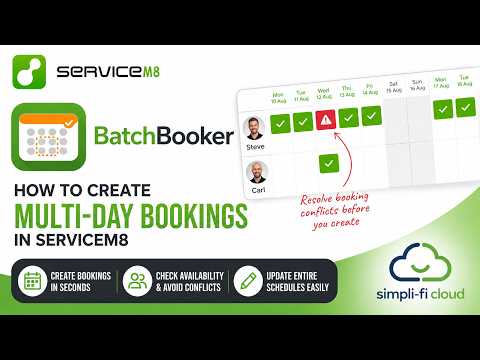
Schedule multiple ServiceM8 bookings across multiple days with a single action. Assign staff, skip weekends, and manage multi-day projects without the repetitive admin of creating bookings one by one.
About Batch Booker
Listed in Add-On Integration Software.
Batch Booker for ServiceM8
Scheduling a larger job in ServiceM8 can quickly turn into a surprisingly big admin task. If a job needs five staff for six days, those bookings have to be created individually — that's 30 separate diary entries just to schedule one job. If the project then moves by a week, the whole lot needs changing again. If it's cancelled, they all need removing.
Batch Booker solves this by letting you create, edit, move, and delete batch bookings across multiple days in one action.
Key Features
- Multi-Day Scheduling — Create bookings across multiple days with a single action. Set your start date and duration, and let Batch Booker handle the rest.
- Multiple Staff Assignment — Assign multiple team members to the same batch booking, perfect for projects requiring several technicians or crew members.
- Smart Weekend Skipping — Automatically skip weekends when creating batch bookings, ensuring your schedule matches your working days.
- Custom Time Slots — Set specific start and end times for each booking, including overnight bookings that span midnight.
- Edit Staff & Dates — Add or remove staff members from existing batches. Select specific dates to modify without affecting the entire batch.
- Move & Manage Batches — Easily move entire batches to new dates or delete specific bookings for full control over your batch bookings.
Pricing
£1.99 per month - available from the ServiceM8 Addon Store only
How It Works
- Install from the ServiceM8 Add-ons Store — Navigate to Settings > Add-ons in your ServiceM8 account, search for "Batch Booker", and activate it.
- Open a Job Card — Click the "Create Batch Booking" button from any job card.
- Configure Your Batch — Set the start date, number of days, time slot, staff members, and whether to skip weekends.
- Create Bookings — Click to generate all bookings in ServiceM8 automatically. Batch names include the ServiceM8 job number for easy identification.
Tips
- For shifts spanning midnight (e.g., 22:00 to 04:00), the add-on automatically sets the end date to the next day.
- Only active staff members appear in the selection list, keeping your options clean and relevant.
- Use "Edit Staff" to add or remove staff from specific dates without affecting the entire batch.
Batch Booker is a ServiceM8 add-on by Simpli-Fi.
About The Developer
Simpli-Fi Cloud is a UK-based software developer and official ServiceM8 partner specializing in building add-ons and automated workflow integrations for field service and trade businesses.
Location
Where to find Batch Booker.
Related Listings
Explore more listings in this category

Add-On Integration Software
QuoteGuard
An independent ServiceM8 add-on that checks quotes against your own completed jobs for possible material and labour cost gaps. Early beta, seeking ServiceM8 businesses from any trade to help test it.

Add-On Integration Software
PPM Service Contracts
The complete planned maintenance add-on for ServiceM8. Automate service contracts, maintenance scheduling, compliance tracking, and job generation — all seamlessly integrated with your ServiceM8 account.

Add-On Integration Software
Zingly
AI-powered social media marketing platform that turns completed ServiceM8 jobs into ready-to-post Facebook, Instagram and Google Business Profile content — helping tradies stay visible online without the extra admin.

Add-On Integration Software
SiteSafe Pro
Turn any ServiceM8 job into professional, site-specific safety documentation in minutes.